myCourses

myCourses

A centralized dashboard for student productivity and collaboration.

00

Problem

Managing coursework across multiple classes is often overwhelming for students due to cluttered navigation, inconsistent organization, and limited support for tracking deadlines and discussions. Important information is frequently buried, making it difficult for students to maintain clarity, stay organized, and confidently manage their academic responsibilities within a single platform.

Solution

This project rethinks course management as a guided academic workflow by prioritizing tasks, simplifying discussions, and embedding contextual AI support. It helps students quickly understand what needs attention, access the right resources, and stay oriented, focused, and on track across multiple courses.

product

Learning Management System

category

UX Design

tools

Figma

timeframe

Aug 2025 - Dec 2025

MyCourses is the primary learning management system used by students at RIT to manage coursework, assignments, discussions, and academic communication. Students rely on it daily to stay on top of deadlines, access course materials, and coordinate with peers and faculty across multiple classes.

Despite being central to academic life, MyCourses often functions more as a content repository than a supportive workflow, requiring students to piece together information across courses, tabs, and external tools.

Design Process

01

01

How students currently navigate MyCourses and where the experience breaks down

02

02

Uncovering how students track coursework, communicate, and stay on top of deadlines

03

03

Reframing course management from scattered pages into a guided academic workflow

04

04

Redesigning assignments and discussions as centralized, task-driven experiences

05

05

Reducing navigation effort while improving clarity, focus, and collaboration

01

Context & Existing Experience Audit

The existing MyCourses interface prioritizes content storage over task clarity. Navigation friction and fragmented workflows make even routine tasks unnecessarily complex. A closer look at the existing experience reveals several recurring breakdowns that directly impact how students track work, find information, and collaborate.

1. Coursework is fragmented across courses

1. Coursework is fragmented across courses

2. Assignments prioritize submission over understanding

2. Assignments prioritize submission over understanding

Students must enter individual courses to view assignments, discussions, and materials. There is no reliable way to see all academic responsibilities in one place, forcing students to mentally stitch together their workload across tabs and classes.

Students must enter individual courses to view assignments, discussions, and materials. There is no reliable way to see all academic responsibilities in one place, forcing students to mentally stitch together their workload across tabs and classes.

Clicking on an assignment often leads directly to the submission interface, while instructions, reference materials, or context are buried elsewhere in the course content. This makes it difficult to fully understand expectations before uploading work.

Clicking on an assignment often leads directly to the submission interface, while instructions, reference materials, or context are buried elsewhere in the course content. This makes it difficult to fully understand expectations before uploading work.

3. Discussions function as one-way submissions

3. Discussions function as one-way submissions

4. High cognitive load from inconsistent structures

4. High cognitive load from inconsistent structures

Most discussion threads are structured like assignments rather than conversations. Students post responses but rarely engage with each other, resulting in minimal interaction and little sense of ongoing dialogue.

Most discussion threads are structured like assignments rather than conversations. Students post responses but rarely engage with each other, resulting in minimal interaction and little sense of ongoing dialogue.

Course layouts, naming conventions, and navigation patterns vary by instructor. This inconsistency increases the time and mental effort required to find information, even for experienced users.

Course layouts, naming conventions, and navigation patterns vary by instructor. This inconsistency increases the time and mental effort required to find information, even for experienced users.

02

Research & Understanding

To validate these observations, I conducted a student survey focused on how learners use MyCourses in their day-to-day academic workflow. The goal was to understand real behaviors rather than ideal scenarios—how students track assignments, find instructions, and collaborate with peers when time and attention are limited.

User Research Insights

72%

72%

72%

72%

of students reported difficulty tracking assignments across multiple courses.

of students reported difficulty tracking assignments across multiple courses.

64%

64%

said they often search through multiple tabs or folders to find assignment instructions.

said they often search through multiple tabs or folders to find assignment instructions.

50%

50%

rely on external tools like group chats or personal trackers to stay organized.

rely on external tools like group chats or personal trackers to stay organized.

"I struggle to keep track of deadlines across all my courses in one place."

"Every course feels like it’s organized differently, so nothing is predictable"

"MyCourses feels more like a submission portal than a place to collaborate."

"We use group chats because discussions don’t really encourage conversations."

User Persona

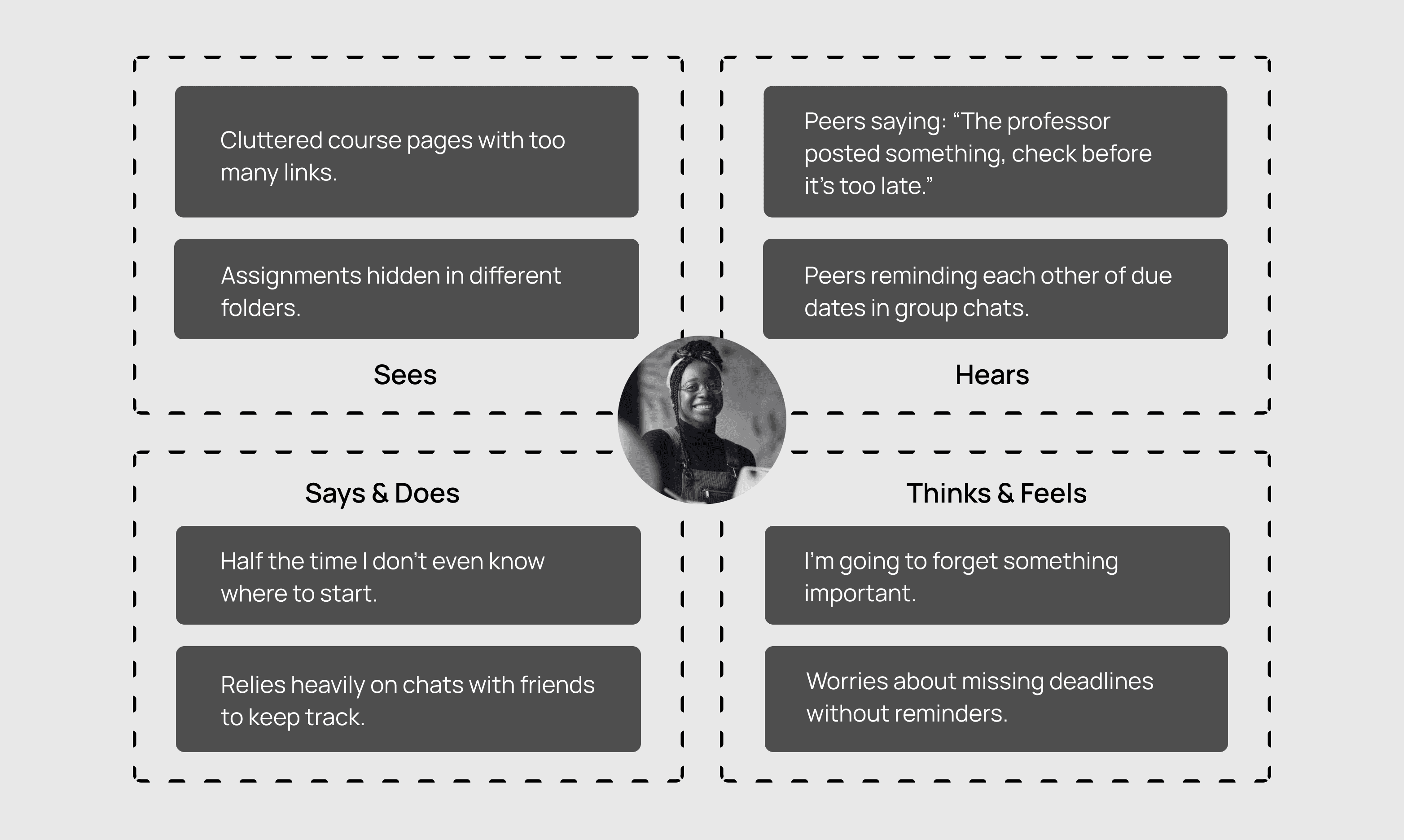
Empathy Map
Synthesis: Where Audit and Research Converged

Students reported difficulty tracking assignments across classes, searching through multiple tabs to find instructions, and relying on external tools like group chats to stay organized. These responses directly aligned with the audit findings around fragmentation, buried context, and cognitive overload.

03

Defining the Opportunity

With the key pain points identified, the focus shifted to defining a clear design direction. This phase translated research insights into concrete goals, restructured information architecture, and established principles to guide the redesigned experience.

Design Goals

01

Never Miss an Assignment

Make deadlines difficult to miss by prioritizing tasks based on urgency, visibility, and time sensitivity across all courses.

02

Strengthen Collaboration

Design discussions that are easier to follow, revisit, and engage with, helping students stay involved without missing context.

03

Reduce Cognitive Load

Reduce mental effort by simplifying navigation and surfacing only what matters most at each step.

Core Workflows: Existing vs Redesigned

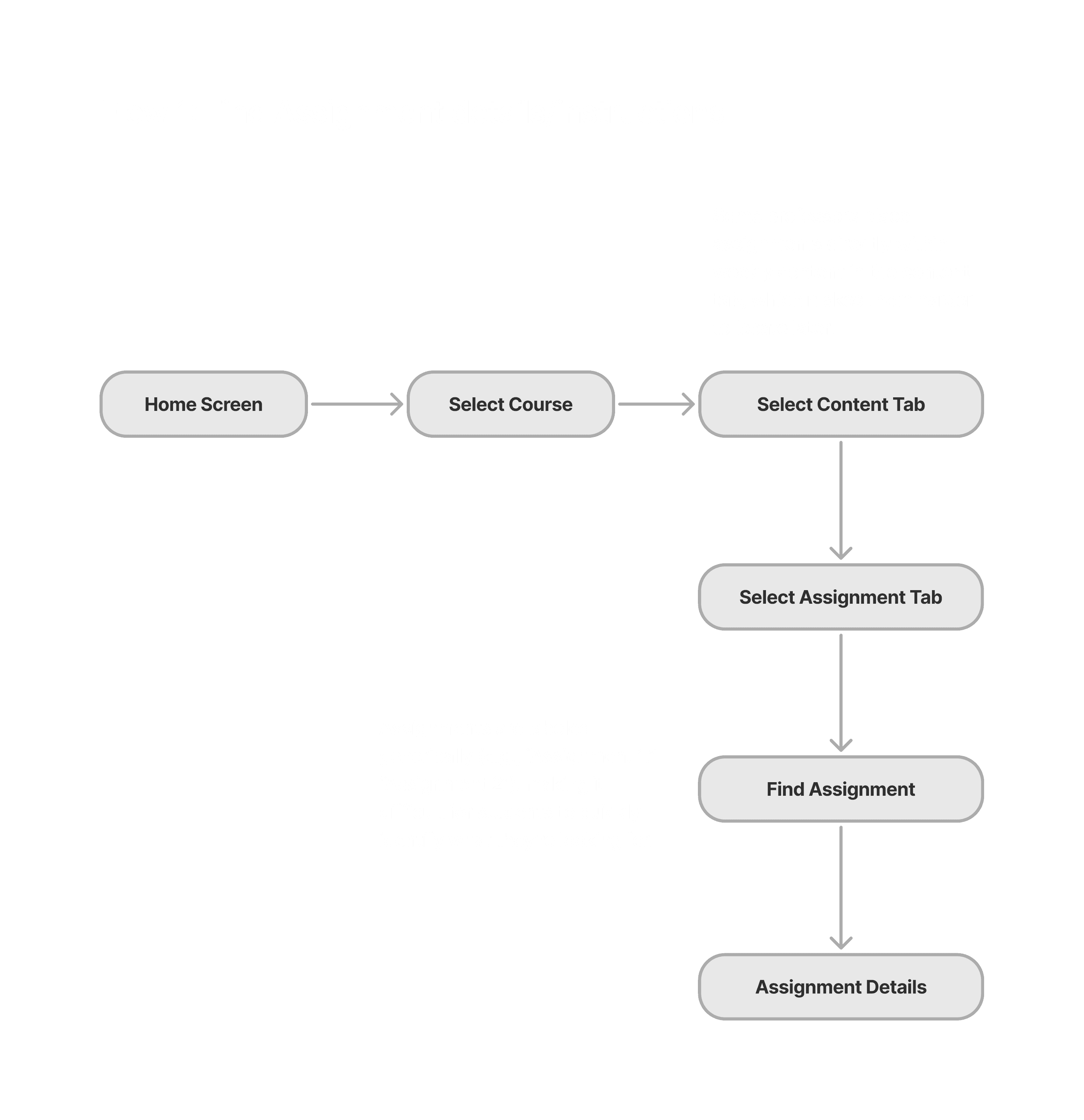
Fragmented Assignment Workflows

Assignments, a core feature of MyCourses, are accessed through multiple disconnected flows depending on whether students are looking for instructions or submitting work. Both pathways are buried within individual courses, with no centralized view across classes. This fragmentation increases cognitive load and makes it difficult for students to confidently track what’s due.
Task-First Assignment Architecture

Assignments are no longer buried within individual courses. By introducing layered entry points that converge into a centralized hub, the system reduces cognitive load and enables students to manage deadlines across courses with clarity and control.

Disconnected Discussion Workflows

Discussions, intended to foster collaboration, function more like static submission threads than ongoing conversations. Access is limited to individual courses, with no global visibility into active discussions. The absence of notifications, engagement indicators, and clear reply pathways makes it difficult for students to track activity or participate meaningfully over time.

Centralized & Interactive Discussions System

Discussions are redesigned as dynamic, searchable collaboration spaces. With unified access, clearer thread entry points, and AI-supported summaries, students can follow conversations, participate meaningfully, and stay informed without navigating fragmented course pages.

04

Design & Exploration

After defining the core architecture and workflows, the next step was translating these insights into a cohesive interface. The design phase focused on exploring layouts, prioritizing task visibility, and creating a system that reduces cognitive load while supporting cross-course navigation.

Initial Wireframes

Final UI Design

01 Academic Dashboard

01 Academic Dashboard

Overview

Overview

The redesigned dashboard brings together the most important academic signals across courses into a single, glanceable workspace.

The redesigned dashboard brings together the most important academic signals across courses into a single, glanceable workspace.

The redesigned dashboard brings together the most important academic signals across courses into a single, glanceable workspace.

Key Features of the Academic Dashboard

Key Features of the Academic Dashboard
  • Course Cards

  • Course Cards

  • Course Cards

Course cards surface assignments, discussions, and content activity so students can quickly understand course status and jump to relevant sections.

Course cards surface assignments, discussions, and content activity so students can quickly understand course status and jump to relevant sections.

Course cards surface assignments, discussions, and content activity so students can quickly understand course status and jump to relevant sections.

  • AI Support for Academic Tasks

An integrated assistant helps students break down assignments, find resources, and manage academic workload.

  • Assignment Visibility

Assignments appear in one place with urgency indicators and quick upload actions.

  • Recent Discussion Activity

Active discussion threads are shown on the dashboard so students can quickly join conversations and stay updated.

  • AI Support for Academic Tasks

An integrated assistant helps students break down assignments, find resources, and manage academic workload.

  • Assignment Visibility

Assignments appear in one place with urgency indicators and quick upload actions.

  • Recent Discussion Activity

Active discussion threads are shown on the dashboard so students can quickly join conversations and stay updated.

  • AI Support for Academic Tasks

An integrated assistant helps students break down assignments, find resources, and manage academic workload.

  • Assignment Visibility

Assignments appear in one place with urgency indicators and quick upload actions.

  • Recent Discussion Activity

Assignments appear in one place with urgency indicators and quick upload actions.

02 Assignment Workspace

Overview

Overview

The Assignment workspace centralizes coursework across all courses, helping students track progress, prioritize tasks, and take action from a single interface.

The Assignment workspace centralizes coursework across all courses, helping students track progress, prioritize tasks, and take action from a single interface.

Key Features of the Assignment Workspace

Key Features of the Assignment Workspace
  • AI-Powered Academic Support

  • AI-Powered Academic Support

An integrated assistant provides contextual help by breaking down assignments, suggesting strategies, and surfacing relevant resources.

An integrated assistant provides contextual help by breaking down assignments, suggesting strategies, and surfacing relevant resources.

  • Priority-Based Assignment Organization

Assignments are grouped by status—In Progress, Upcoming, and Submitted—allowing students to focus on what needs immediate attention.

  • Quick Actions for Submission

Upload and access details directly from assignment cards, enabling faster task completion without unnecessary navigation.

  • Clear Status & Urgency Indicators

Visual cues such as deadlines, time left, and submission status help students quickly assess urgency and stay on track.

  • Priority-Based Assignment Organization

Assignments are grouped by status—In Progress, Upcoming, and Submitted—allowing students to focus on what needs immediate attention.

  • Quick Actions for Submission

Upload and access details directly from assignment cards, enabling faster task completion without unnecessary navigation.

  • Clear Status & Urgency Indicators

Visual cues such as deadlines, time left, and submission status help students quickly assess urgency and stay on track.

Overview

The Assignment workspace centralizes coursework across all courses, helping students track progress, prioritize tasks, and take action from a single interface.

The Assignment workspace centralizes coursework across all courses, helping students track progress, prioritize tasks, and take action from a single interface.

Key Features of the Assignments Page

  • AI-Powered Academic Support

  • AI-Powered Academic Support

An integrated assistant provides contextual help by breaking down assignments, suggesting strategies, and surfacing relevant resources.

An integrated assistant provides contextual help by breaking down assignments, suggesting strategies, and surfacing relevant resources.

  • Priority-Based Assignment Organization

Assignments are grouped by status—In Progress, Upcoming, and Submitted—allowing students to focus on what needs immediate attention.

  • Quick Actions for Submission

Upload and access details directly from assignment cards, enabling faster task completion without unnecessary navigation.

  • Clear Status & Urgency Indicators

Visual cues such as deadlines, time left, and submission status help students quickly assess urgency and stay on track.

  • Priority-Based Assignment Organization

Assignments are grouped by status—In Progress, Upcoming, and Submitted—allowing students to focus on what needs immediate attention.

  • Quick Actions for Submission

Upload and access details directly from assignment cards, enabling faster task completion without unnecessary navigation.

  • Clear Status & Urgency Indicators

Visual cues such as deadlines, time left, and submission status help students quickly assess urgency and stay on track.

Flexible Filtering and Sorting

Flexible Filtering and Sorting

Students can filter assignments by course and sort them based on priority, enabling a more personalized and focused view of their workload. This flexibility allows users to quickly narrow down what matters most at any moment.

Students can filter assignments by course and sort them based on priority, enabling a more personalized and focused view of their workload. This flexibility allows users to quickly narrow down what matters most at any moment.

Flexible Filtering and Sorting

Students can filter assignments by course and sort by priority, helping them customize views based on their workflow.

Students can filter assignments by course and sort by priority, helping them customize views based on their workflow.

Assignment Details View

Assignment Details View

The Assignment Details view brings together deadlines, points, detailed instructions, and submission guidelines in one place. Students can access resources, use AI to find materials, download instructions, and complete the assignment through upload or submission actions.

The Assignment Details view brings together deadlines, points, detailed instructions, and submission guidelines in one place. Students can access resources, use AI to find materials, download instructions, and complete the assignment through upload or submission actions.

Assignment Details View

The Assignment Details view brings together deadlines, points, detailed instructions, and submission guidelines in one place. Students can access resources, use AI to find materials, download instructions, and complete the assignment through upload or submission actions.

Assignment Submission

Assignment Submission

The Assignment Submission flow enables students to upload files, review their submission, and save drafts or submit final work within a single interface. It provides a clear and streamlined process for completing submissions while ensuring all required actions are easily accessible.

The Assignment Submission flow enables students to upload files, review their submission, and save drafts or submit final work within a single interface. It provides a clear and streamlined process for completing submissions while ensuring all required actions are easily accessible.

Assignment Submission

The Assignment Submission flow enables students to upload files, review their submission, and save drafts or submit final work within a single interface. It provides a clear and streamlined process for completing submissions while ensuring all required actions are easily accessible.

03 Discussion Hub

03 Discussion Hub

Overview

Overview

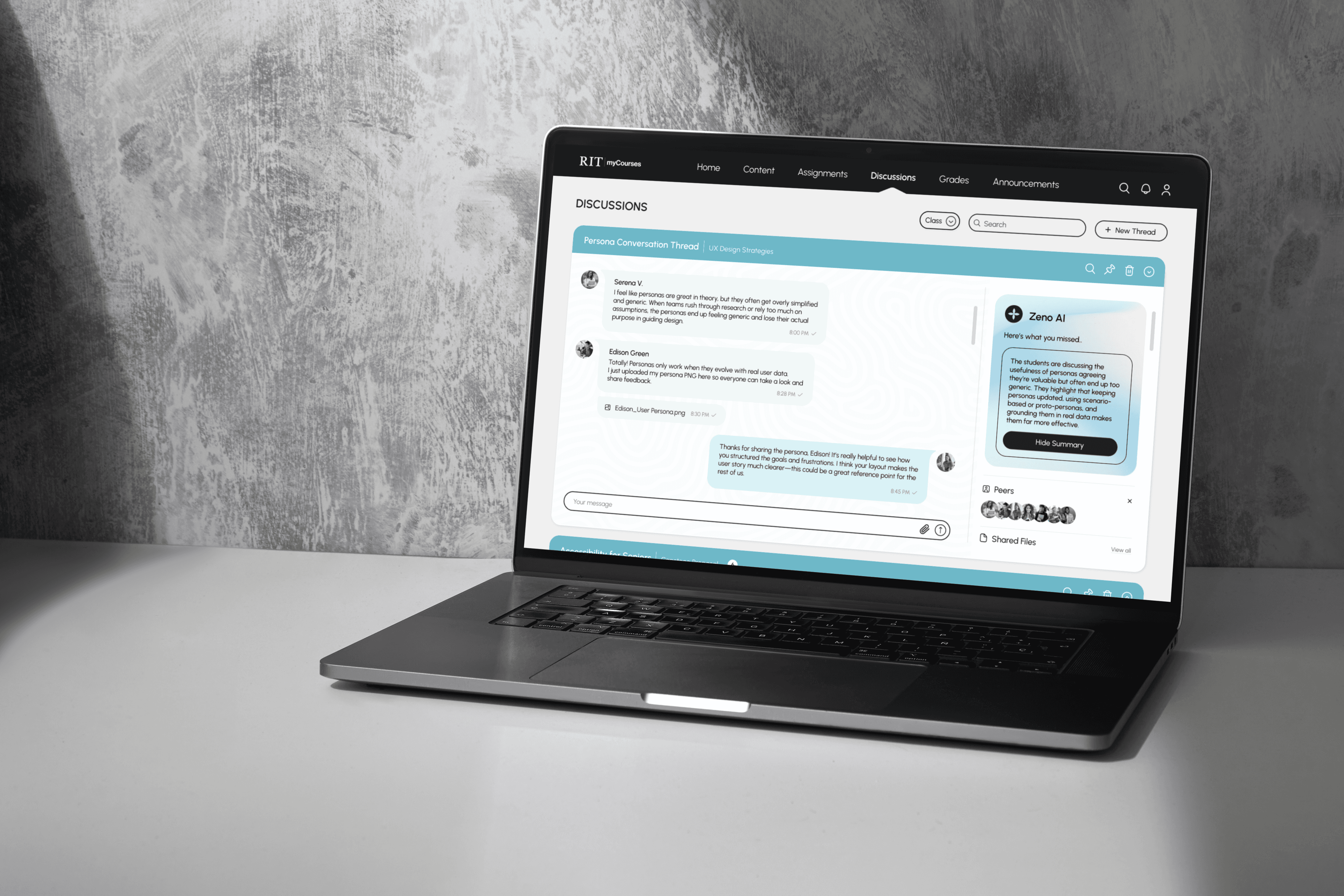
The Discussion Hub centralizes conversations across courses, allowing students to read, respond, and stay engaged in ongoing threads. With integrated tools for collaboration, file sharing, and AI-assisted summaries, the interface makes discussions easier to follow and participate in.

The Discussion Hub centralizes conversations across courses, allowing students to read, respond, and stay engaged in ongoing threads. With integrated tools for collaboration, file sharing, and AI-assisted summaries, the interface makes discussions easier to follow and participate in.

The Discussion Hub centralizes conversations across courses, allowing students to read, respond, and stay engaged in ongoing threads. With integrated tools for collaboration, file sharing, and AI-assisted summaries, the interface makes discussions easier to follow and participate in.

Key Features of the Discussion Hub

Key Features of the Discussion Hub
  • Unified Discussion Threads

  • Unified Discussion Threads

  • Unified Discussion Threads

All course discussions are accessible in a single view, helping students track conversations without navigating into individual course pages.

All course discussions are accessible in a single view, helping students track conversations without navigating into individual course pages.

All course discussions are accessible in a single view, helping students track conversations without navigating into individual course pages.

  • AI-Powered Summarization

An integrated assistant provides quick summaries of discussions, helping students catch up on conversations without reading every message.

  • Peer Visibility & Shared Resources

Students can view active participants and access shared files in one place, supporting collaboration and quick reference to discussion materials.

  • Quick Interaction & Thread Actions

Students can search, join, respond, and create new threads directly from the interface, supporting seamless participation in discussions.

  • AI-Powered Summarization

An integrated assistant provides quick summaries of discussions, helping students catch up on conversations without reading every message.

  • Peer Visibility & Shared Resources

Students can view active participants and access shared files in one place, supporting collaboration and quick reference to discussion materials.

  • Quick Interaction & Thread Actions

Students can search, join, respond, and create new threads directly from the interface, supporting seamless participation in discussions.

  • AI Support for Academic Tasks

An integrated assistant helps students break down assignments, find resources, and manage academic workload.

  • Assignment Visibility

Assignments appear in one place with urgency indicators and quick upload actions.

  • Recent Discussion Activity

Assignments appear in one place with urgency indicators and quick upload actions.

Thread Creation Flow

Thread Creation Flow

Students can quickly create new discussion threads by selecting a course, adding peers, and composing their message within a focused panel, enabling seamless initiation of collaborative conversations.

Students can quickly create new discussion threads by selecting a course, adding peers, and composing their message within a focused panel, enabling seamless initiation of collaborative conversations.

Thread Creation Flow

Students can quickly create new discussion threads by selecting a course, adding peers, and composing their message within a focused panel, enabling seamless initiation of collaborative conversations.

AI Discussion Summarization

AI Discussion Summarization

Students can generate quick summaries of ongoing conversations, allowing them to catch up on key points without reading every message and stay aligned with the discussion context.

Students can generate quick summaries of ongoing conversations, allowing them to catch up on key points without reading every message and stay aligned with the discussion context.

AI Discussion Summarization

Students can generate quick summaries of ongoing conversations, allowing them to catch up on key points without reading every message and stay aligned with the discussion context.

05

Outcome and Impact

The redesigned system successfully addresses the initial design goals. The updated workflows reduce the number of steps required to access and complete key academic tasks.

01 Cross-Course Visibility

Students can now view assignments and discussions across all courses from centralized hubs rather than navigating into each course individually.

02 Reduced Navigation Depth

Layered entry points from the Home dashboard and global navigation allow students to access tasks in fewer steps.

03 Improved Collaboration

Discussion threads are redesigned as active conversation spaces where students can follow messages, share files, and interact with peers more naturally.

04 Clearer Academic Overview

The dashboard surfaces key academic signals such as deadlines, updates, and conversations, helping students prioritize work and stay organized.

Task Steps Reduction

5 → 2

Assignment submission steps

4 → 1

Assignment discovery

3 → 1

Discussion access

.say hello

Got an idea or project in mind?
Let's build something meaningful together.

.say hello

Got an idea or project in mind?
Let's build something meaningful together.

Create a free website with Framer, the website builder loved by startups, designers and agencies.